
HP Laserjet M607 M608 M609 Printer Repair:
Jam Codes, Fuser Faults, and Field Diagnostics
Project Brief
Most requests for HP Laserjet M607 M608 M609 Printer Repair arrive with a number attached — a 13-series jam code, a 50-series fuser fault, or a control panel asking for a new fuser kit. Those numbers are not vague complaints. HP’s engine reports exactly which sensor stopped seeing paper and exactly when it stopped, which turns most of these calls into a short, evidence-based diagnosis instead of a guessing exercise.
This page walks through what the M600-series engine is actually reporting, how our technicians read those codes onsite, and which components tend to be at fault. It is written for the person who owns the fleet, not the person who designed it.

Key Takeaways
- Jam codes on this platform follow a
13.WX.YZstructure where each character identifies a location, a sensor, a failure condition, and a paper source — the code itself narrows the repair before a panel is opened. - Fuser faults follow a
50.WX.YZstructure. The first digit after the decimal distinguishes a cold fuser from an overheating one from a mechanical pressure-release failure, and those are three different repairs. - The single most common root cause we find behind repeat jams is not a broken part at all. It is worn or incorrectly seated tray rollers.
- A fuser at end of life produces print defects and wrap jams long before it produces a hard fault, which is why HP Laserjet M607 M608 M609 Printer Repair calls are often preventable.
- The 225,000-page maintenance kit interval is the practical dividing line between a printer that is worth servicing and one that is being neglected.
$69.99 Onsite HP Laserjet M607 M608 M609 Printer Repair Promotion
What the M600-Series Engine Is Actually Doing
The HP M607, M608, and M609 share one engine platform. They differ in rated speed and duty cycle, not in paper path architecture, which is why a fault pattern on one model reads identically on the other two.
Paper leaves a tray, passes a feed sensor, reaches the registration sensor PS4550 to square up against the image, travels through the transfer area, enters the fuser, clears the fuser output sensor PS4650, and exits to the bin. Four sensors, one direction, tight timing windows.
Every jam code is the engine reporting that a sheet arrived at one of those checkpoints too late, too early, or not at all — or that it never left. Understanding that one idea makes the entire 13-series table readable rather than intimidating.
The same logic governs the fuser. Thermistors report film temperature continuously, and a 50-series fault means the reading fell outside the expected envelope for the current print mode. Whether that is a heating problem, a power problem, or a mechanical problem is what the specific digit tells us.
Symptoms That Show Up Before the Error Code Does
Hard faults rarely arrive without warning. In our experience, an HP LaserJet M607 M608 M609 Fuser Error is preceded by weeks of subtle output changes that nobody logs because the printer is still technically working.
Toner that smudges under a thumb is the classic early indicator. So is faded output that darkens again after the printer has been idle, or a repeating defect that appears at a fixed interval down the page.
Print Quality Problems of that kind point at the fuser or transfer roller far more often than at the toner cartridge, which is where most offices look first. Replacing a perfectly good cartridge is the most common wasted expense we see on this platform.
On the paper handling side, the tell is frequency rather than severity. A single HP LaserJet M607 Paper Jam in a month is noise. Three in a week from the same tray is a roller reaching end of life.
Watch also for sheets that arrive skewed, or stacks that feed two at a time. Both point at the Separation Roller losing its grip differential rather than at the paper stock everyone tends to blame.
Reading 13-Series Jam Codes and 50-Series Fuser Faults
How the jam code is built
HP publishes these as 13.WX.YZ. W is the jam location, X is the sensor or door that triggered it, Y is the failure condition, and Z is the paper source or fuser mode.
The Y character does most of the diagnostic work. D means delay — the sheet never reached the sensor in time. A means stay — it reached the sensor and never left. C means wrap, F means residual paper detected at power-on, and E means a door opened mid-print.
If you searched a short legacy code such as 13.01, 13.03, 13.05, 13.20, or 13.21, those belong to earlier LaserJet generations. HP does not publish them as discrete codes for the M607, M608, or M609 — the equivalent conditions appear here in the expanded four-character format above.
Documented jam codes on this platform
| Code | What the engine detected | Common cause |
|---|---|---|
| 13.00.0E | Jam feeding from the envelope feeder cassette | Poor-quality or misoriented envelopes |
| 13.00.EE | The printer indicates an unknown door-open status. | Failed interlock or door projection |
| 13.00.FF | The printer has detected an unresolved paper jam without identifying the affected sensor. | Fragment left behind from a prior jam |
| 13.A1.D1 | Sheet never reached the Tray 1 feed sensor PS4750 | Worn Tray 1 pickup or feed roller, failed solenoid |
| 13.A1.A1 | Sheet reached PS4750 and stayed | Feed clutch CL1 failure, obstruction below Tray 1 |
| 13.A1.FF | Residual paper at PS4750 at power-on | Debris in the Tray 1 feed guide assembly |
| 13.AA.EE / 13.AB.EE | Front or rear door opened during printing | Broken door projection or failed switch |
| 13.B2.D2 | Sheet never reached registration sensor PS4550 from Tray 2 | Tray 2 roller wear, roller tab not latched, overfilled tray |
| 13.B2.Ax | Sheet stayed at PS4550 longer than expected | Registration assembly fault, media out of spec |
| 13.B2.FF | Residual paper at PS4550 | Fragment behind the transfer assembly |
| 13.B4.FF | Residual paper at fuser loop sensor PS4500 | Debris inside or ahead of the fuser |
| 13.B9.Ax | Sheet stayed at fuser output sensor PS4650 | Accordion jam at fuser exit, output rollers not turning, sticky exit flag |
| 13.B9.Cx | Sheet vanished from PS4650 early — wrap detected | Paper wrapping the fuser roller; worn fuser |
| 13.B9.Dx | Sheet never reached PS4650 | Transfer area damage or fuser drive fault |
| 13.D3.Dx | Late to duplex refeed | Duplex sensor PS4700 or refeed clutch |
| 13.E1.Dx | Sheet never reached the output bin sensor | Delivery assembly or worn fuser |
A recurring HP LaserJet M607 M608 M609 Paper Jam almost always resolves to one of three families: tray roller wear, a transfer-area obstruction, or a fuser at end of life. Owners of the older 600-series see the same clustering, which is why a HP Laserjet M600 M601, M602 M603 Paper Jam troubleshooting sequence looks broadly similar despite the different code format.
Documented fuser faults
Fuser codes display as 50.WX.YZ — for example, 50.7F.00. W identifies the fault, X is the fuser mode, and Y and Z record sleep states.
| Code | Meaning | Where we look first |
|---|---|---|
| 50.1 | Lower fuser temperature — film never reaches target | Failed heater, drafty location, seating |
| 50.2 | Faulty Warm-up — warm-up window timed out | Fuser, low-power supply, firmware level |
| 50.3 | Raised fuser temperature at the main thermistor | Thermistor or DC controller circuit |
| 50.4 | Faulty fuser or unstable AC line voltage | Surge strip or UPS in the circuit |
| 50.5 | Inconsistent fuser — wrong type or voltage installed | Verify 110V RM2-1256 vs 220V RM2-1257 |
| 50.7 | Faulty Pressure release mechanism | Fuser drive assembly RM2-6763 |
| 50.9 | High fuser temperature at the sub-thermistor | Secondary thermistor circuit |
A one-time HP LaserJet M608 Fuser Error that clears after a full power cycle is worth watching rather than acting on. A code that returns within days is telling you the fuser is failing, and a repeat HP LaserJet M609 Fuser Error on a unit past 200,000 pages is effectively a replacement notice.
Onsite Diagnostic Sequence, Step by Step
Our technicians work these codes in a fixed order, because skipping ahead to parts replacement is how a straightforward call becomes an expensive one.
Diagnosing a 13.B2.D2 jam
- Pull Tray 2 fully out. Remove any damaged sheets and confirm the orange shipping locks are gone.
- Open the rear door, raise the primary transfer assembly, and pull the green tab to open the lower access cover. Clear paper straight out, never sideways — sideways pulls dislodge rollers.
- Check the blue roller tab. If the flap is down, the rollers are seated incorrectly, and that alone generates this code.
- Pull the event log and look for 53.B0.0z entries. Those indicate the Feed Roller and Separation Roller for that tray are near end of life.
- Clean the Pickup Roller, feed / separation rollers with a lint-free cloth dampened with warm water. Replace the J8J70-67904 roller assembly if the surfaces are glazed.
- Run Support Tools > Troubleshooting > Diagnostic Tests > Components Test and fire the Tray 2 pickup solenoid. No click means the pickup assembly is suspect.
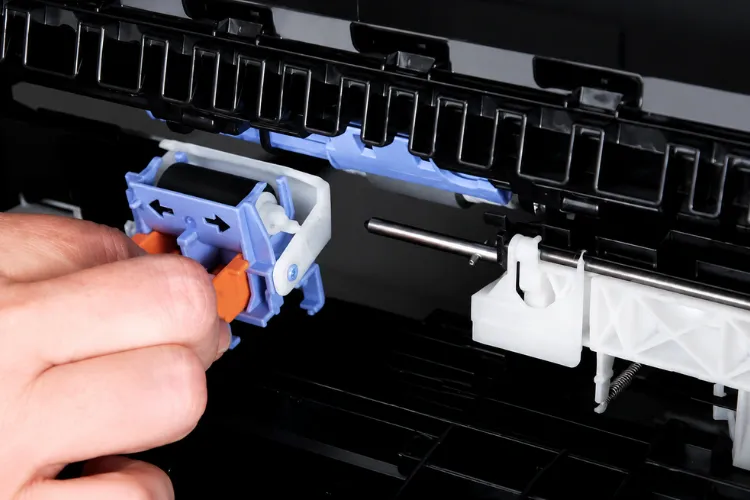
Diagnosing a 13.B9 fuser-area jam
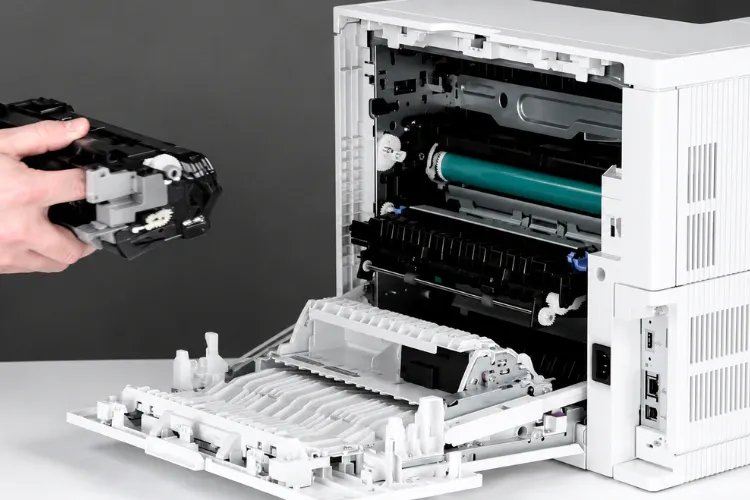
- Power down, open the rear door, and remove the fuser. It will be hot.
- Inspect for paper wrapped around the fuser roller. Wrap on this platform is a wear signature, not a media problem.
- Confirm the output bin rollers turn freely. The distance from fuser exit to bin is short enough that a stalled output roller reports as a fuser jam.
- Check the fuser exit flag for stickiness. A flag delayed even momentarily in the activated position produces this code.
- Run a cleaning page to clear toner buildup from the film.
- Test PS4650 in Manual Sensor Test. Run the Fuser motor under Components Test. A motor failure points at fuser drive assembly other than the fuser itself.
Diagnosing a 50-series fault
- Power the printer off, wait thirty seconds, and power it back on. Genuine transient faults clear here.
- Move the printer to a dedicated wall outlet. Surge strips and UPS units are a documented contributor to 50.4.
- Verify the printer is not sitting in front of a vent or a drafty window, which starves the fuser during warm-up.
- Reseat the fuser and inspect its connector for burn marks or bent pins. Check J401 and J402 on DC controller before condemning any part.
- Confirm that the replacement fuser is designed for the printer’s required voltage. A 50.5 is frequently a 220V unit in a 110V machine after a previous repair.
- Update engine firmware. HP recommends this as a standard step for any persistent code on this platform.
Working a code this way means the repair is grounded in what the printer measured, not in what a symptom suggested.
Need HP LaserJet M607, M608, or M609 Printer Repair?
Repair Recommendations and Parts Priority
Fuser Replacement is the correct call for confirmed 50.1, 50.2, and most 50.7 faults, and for any 13.B9 wrap jam on a high-mileage unit. The 110V assembly is RM2-1256; the 220V is RM2-1257.
We replace the transfer roller (RM2-6800) alongside the fuser rather than separately. The labor overlaps almost entirely, and a worn transfer roller undermines a new fuser’s output quality within weeks.
Tray rollers are the highest-value, lowest-cost intervention on this printer series. A J8J70-67904 roller assembly resolves the majority of repeat tray jams, and the parts cost is a small fraction of a fuser.
Before replacing anything expensive, Printer Repair Pasadena Conducts a thorough inspection to identify the true source of the problem. We have opened plenty of machines where a previous vendor installed a fuser to solve what turned out to be a stalled output roller.
For HP LaserJet M607 Printer Repair, HP LaserJet M608 Printer Repair, and HP LaserJet M609 Printer Repair we stock fusers and maintenance kits for immediate installation. HP Parts are used for our repairs, and a reliable third-party toner is available separately with a one-year warranty.
Every service call and installed part carries our 6-month warranty. That applies equally to HP Laserjet Printer Repair across the wider LaserJet range and to HP Color Laserjet Printer Repair on the color platforms we support
Preventative Maintenance and the Kit Cycle
The Maintenance Kit replacement for the following family is L0H24A in 110V, rated to approximately 225,000 pages at standard coverage. It bundles the fuser, transfer roller, and tray pickup and separation rollers.
Owners of older 600-series units will recognize HP LaserJet M607 M608 M609 Perform Maintenance phrasing from previous generations. On this printer series the equivalent notice reads Replace Fuser Kit and logs as 10.23.70, with a 10.23.60 low warning ahead of it.
That distinction matters when people search. HP LaserJet M607 Perform Maintenance, HP LaserJet M608 Perform Maintenance, and HP LaserJet M609 Perform Maintenance all describe the same underlying kit interval even though the panel text has changed.
The fuser kit on these models is tracked as a supply item with its own chip. Installing a genuine HP kit clears the counter automatically, so there is no manual Reset Maintenance Kit procedure to run the way older LaserJets required.
Refurbished kits sometimes ship with a separate counter reset board for this reason. It is worth knowing before you buy one, because the price difference usually reflects that missing chip other than a bargain.
Between kits, routine Printer Maintenance is straightforward. Clean tray rollers quarterly on high-volume units, keep paper in sealed reams away from exterior walls, respect the tray fill line, and set tray type and size correctly in the control panel.
Scheduling Maintenance Kit Replacement proactively — other than after the first hard fault — is the single change that most reduces emergency calls on this platform. A planned kit install takes under an hour. An unplanned failure takes a day out of a department.
Downtime, Fleet Reliability, and Repair Versus Replace
An M609 configured for a busy department is often the only device rated for that volume in the building. When it stops, work does not shift to another printer — it queues.
That is the real cost calculation. Not the invoice for a fuser, but the hours a payroll or billing team spends waiting, and the overtime that follows a missed cutoff.
The repair or replace math on this platform usually favors repair. These are solid machines, parts availability remains good, and a full maintenance kit Costs significantly less than of a comparably rated replacement plus deployment.
Replacement starts being the right choice when a unit has passed two kit cycles and is accumulating faults across unrelated subsystems — formatter, drive assemblies, and paper path all failing in the same year. One failing component is a repair; three unrelated ones are a pattern.
Fleet-wide, the printers that fail least are the ones on a maintenance schedule rather than a complaint schedule. Office Printer Repair and Business Printer Repair budgets shrink noticeably once kit intervals are tracked in the same system that tracks toner.
Our technicians frequently encounter this issue during onsite service calls: three identical M608 units in one building, one of them failing constantly, and the difference turns out to be a single tray nobody rebalanced across the fleet.
The Maintenance Kit for this family is L0H24A in 110V, rated to approximately 225,000 pages at standard coverage. It bundles the fuser, transfer roller, and tray pickup and separation rollers.
Owners of older 600-series units will recognize the HP LaserJet M607 M608 M609 Perform Maintenance phrasing from previous generations. On this printer series the equivalent notice reads Replace Fuser Kit and logs as 10.23.70, with a 10.23.60 low warning ahead of it.
That distinction matters when people search. HP LaserJet M607 Perform Maintenance, HP LaserJet M608 Perform Maintenance, and HP LaserJet M609 Perform Maintenance all describe the same underlying kit interval even though the panel text has changed.
The fuser kit on these models is tracked as a supply item with its own chip. Installing a genuine HP kit clears the counter automatically, so there is no manual Reset Maintenance Kit procedure to run the way older LaserJets required.
Refurbished kits sometimes ship with a separate counter reset board for this reason. It is worth knowing before you buy one, because the price difference usually reflects that missing chip other than a bargain.
Between kits, routine Printer Maintenance is straightforward. Clean tray rollers quarterly on high-volume units, keep paper in sealed reams away from exterior walls, respect the tray fill line, and set tray type and size correctly in the control panel.
Scheduling Maintenance Kit Replacement proactively — other than after the first hard fault — is the single change that most reduces emergency calls on this platform. A planned kit install takes under an hour. An unplanned failure takes a day out of a department.
Paper Jam or Fuser Error Slowing Down Your Office?
When to Schedule Professional HP Laserjet M607 M608 M609 Printer Repair
Some codes are worth an in-house attempt. Clearing a residual jam, reseating a fuser, and cleaning tray rollers are all reasonable first steps for an IT team.
Call us when a code returns after those steps, when a fuser fault repeats within a week, when jams migrate between trays, or when print defects persist through a new cartridge. Those patterns point at parts, and parts point at a technician.
We provide Onsite Printer Repair throughout Pasadena and the surrounding cities to the south and east, including Arcadia, Monrovia, Temple City, and Whittier. Same Day Printer Repair is available for many issues on this platform we stock the common fusers and kits.
Printer Repair Pasadena has spent over twenty years in the office equipment industry, and HP LaserJet Enterprise Printer Repair on the 600-series is among the work we do most. That covers HP LaserJet Printer Repair across the LaserJet and Color LaserJet families, including multifunction units.
New Clients can take advantage of our Onsite Printer Repair Promotion. $69.99 Flat Labor Rate for one printer. The promotion maybe subject to limitations and applies to qualifying HP LaserJet and HP Color LaserJet models only.
Call (888) 558-0049 or email info@printer-repair-pasadena.com to schedule.
Technician Recommendations
A few things we would tell any office manager running these units, based on what we actually find in the field.
Read the full code, not the first two digits. A 13.B2.D2 and a 13.B9.C4 are both “paper jams” to a user and two completely different repairs to a technician. Photographing the control panel before clearing the error saves a diagnostic step.
Check the event log before ordering parts. Recurring 53.B0.0z entries tell you the tray rollers are worn, and that information is free.
Keep the printer on a wall outlet. We have resolved more than one persistent 50.4 by removing a surge strip that was never rated for the load a fuser draws during warm-up.
Do not let one HP LaserJet M608 Paper Jam pattern train users to feed from a different tray as a workaround. The original tray is still degrading, and the workaround hides it until two trays fail at once.
Track page count against the 225,000-page kit interval in whatever system tracks your consumables. Kits ordered on a schedule cost the same as kits ordered in a panic, minus the downtime.
Finally, if a unit is producing intermittent HP LaserJet M609 Paper Jam events and clean output, resist the urge to replace the fuser. Clean output means the fuser is doing its job. Look at rollers and sensors first.
Conclusion
The Laser printer M607, M608, and M609 are workhorses, and they fail in predictable, well-documented ways. The engine tells you where the sheet stopped and what the fuser measured, and that information is enough to turn most service calls into a short, confident repair.
An HP LaserJet M607 Fuser Error or a repeating jam is not a signal that the printer is finished. On this platform it is usually a signal that a wear component has reached the end of a well-defined interval.
When the codes stop responding to the basics, HP Laserjet M607 M608 M609 Printer Repair from a technician who reads the event log rather than guessing at parts is the fastest route back to a working fleet. Reach us at (888) 558-0049.
FAQ's - Frequently Asked Questions -
On the 600-series the repair almost always wins. A maintenance kit costs a fraction of a comparably rated replacement, and it restores the fuser, transfer roller, and tray rollers in one visit. Replacement becomes reasonable only when a unit is past two kit cycles and failing across unrelated subsystems.
Clearing a jam removes the sheet but not the cause. Repeat jams from the same tray point at worn rollers or a roller that was reseated incorrectly, and neither condition improves on its own. The event log will usually confirm it with recurring roller wear entries.
Toner that rubs off after printing means it was never bonded, which is a fusing problem rather than a supply problem. This is one of the most common reasons cartridges get replaced unnecessarily. Have the fuser evaluated before buying more toner.
The kit is rated to roughly 225,000 pages at standard coverage. Real-world life varies with paper stock, humidity, and how much duplexing the unit does, so treat the number as a planning target rather than a guarantee.
Frequently, yes. We stock common fusers and maintenance kits for the LaserJet and Color LaserJet families specifically so these calls do not turn into multi-day waits. Availability still depends on the day and the specific configuration.
Service and installed parts carry a 6-month, 180-day warranty.
Yes, and we encourage it for the basics. Clearing residual jams, reseating a fuser, cleaning tray rollers, and updating firmware are all reasonable in-house tasks. Once a code returns after those steps, it has moved into parts territory.
It applies to HP LaserJet and HP Color LaserJet models. Limitations may apply. It may be worth confirming when you call.